Voice Input for Deep Code: Speak Your Mind. AI Figures Out the Rest.
AI has made us dramatically more productive, but typing is still the bottleneck. Voice dictation tools like Siri or Google voice typing work fine for sending a text message, but they have a fundamental blind spot: they know nothing about your project. They transcribe words — they don't understand intent.
You don't need your computer to transcribe what you said. You need it to understand what you want to do.
Deep Code solves this by building voice input directly into the interface, with full awareness of your project context.
Why Generic Voice Tools Fall Short
They Transcribe. They Don't Understand.
Consumer voice tools are built for everyday conversations — texting, quick notes, search queries. Their job is verbatim transcription, word for word.
Controlling AI with your voice is a different problem entirely. You're not dictating a message — you're giving instructions. The difference matters:
- Dictation: "Remind me to buy milk" → transcribed as "Remind me to buy milk"
- AI control: "Change the port in that config file I edited yesterday to 8080" → the AI needs to know which config file, which field, and what value — none of which live in the words alone.
A generic tool captures every word faithfully. It can't resolve what those words actually refer to.
Your Brain Isn't Linear. Their Transcription Is.
You think in tangents. You change your mind mid-sentence. You circle back to earlier ideas. This is normal.
Voice dictation tools use streaming transcription — text appears in real time as you speak. For chat, that's fine. For giving technical instructions, it creates problems:
- Change your mind halfway through? The earlier half pollutes the final prompt.
- Free-associate ideas? They land in chronological order, not logical order.
- Pause to think? The tool doesn't know the difference between a pause and a stopping point.
Your mind works like a mind map. A linear transcription is a straight line — a lot gets lost in between.
Deep Code Voice Input: Built for AI Control
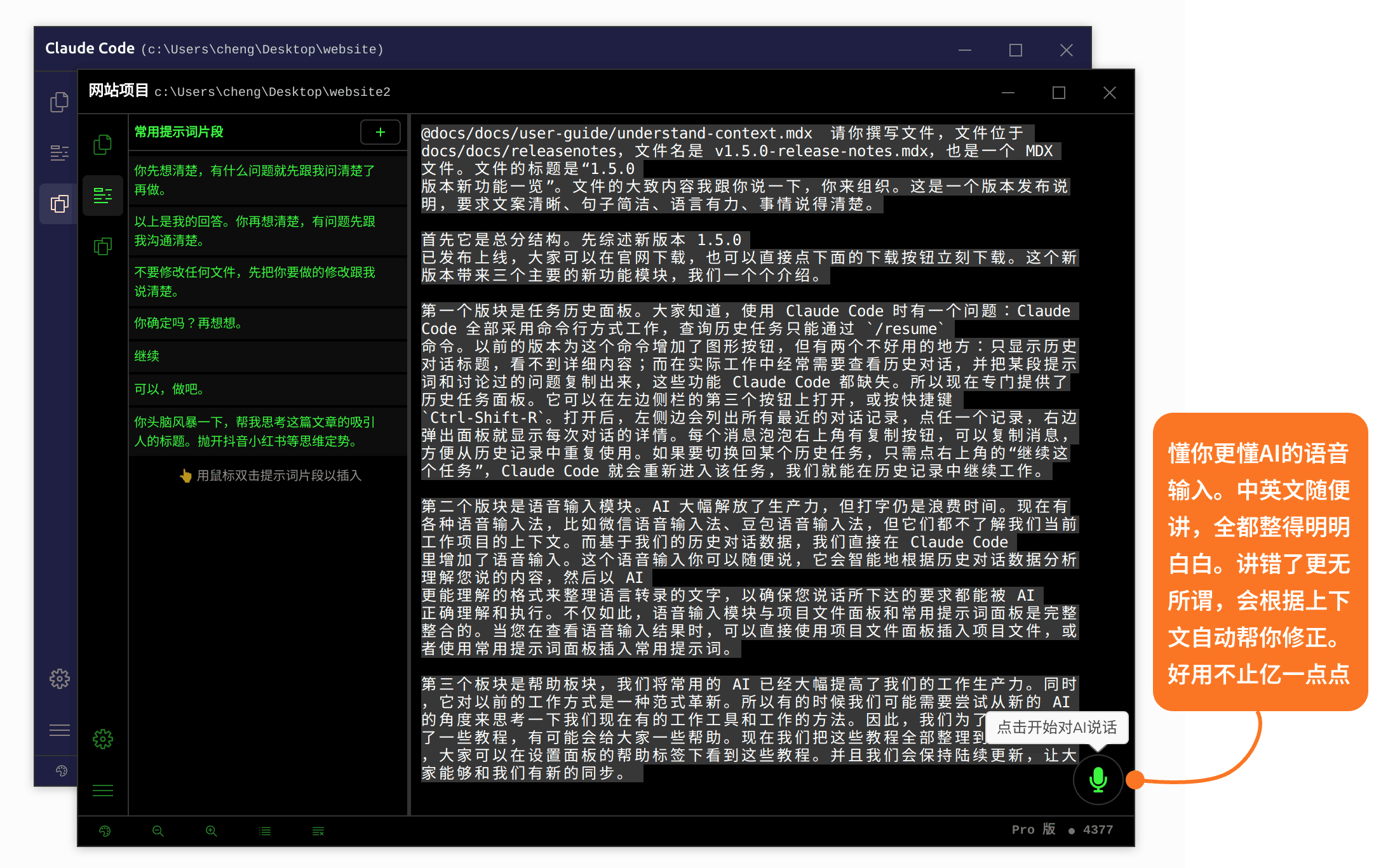
Context-Aware Transcription
Your speech is transcribed, then refined by AI a second time using the current conversation context and your project's file structure.
What this means in practice:
- File names, directory paths, and variable names you mention get matched to their real counterparts in your project.
- Anything you say and then immediately correct gets filtered — not transcribed.
- Scattered, non-linear thoughts get reorganized by importance and logical order.
Example: you're working with config/app.yaml and want the port changed to 8080. You say:
"Change the port in that config file — the app one, the one you worked on before — to 8080. I think I changed it once already but it didn't seem to take..."
A standard dictation tool transcribes that mess verbatim. Deep Code gives you:
"Change the port field in config/app.yaml to 8080."
Speak Freely. Stumbling Is Fine.
This is the whole point.
Standard dictation punishes sloppy speech — every word gets recorded, so a mistake means starting over. The voice input module inverts that assumption. Speak however you want. The system cleans it up.
It handles automatically:
- Mid-sentence corrections: earlier, contradicted content is discarded.
- Vague references: "that file," "the one from yesterday," "the thing we just talked about" — resolved from context.
- Repetition: duplicate ideas are deduplicated.
- Filler words: um, uh, like, you know — stripped out.
Get the gist across. The system does the rest.
Code-Switching and Mixed Terms
Developers mix technical terms into everyday speech constantly — file names, function names, framework names, CLI commands. Generic voice tools are notoriously bad at this, often mangling useSnippets.ts into nonsense or breaking npm install into random words.
The voice input module is optimized for programming contexts. It references your project's file tree to know what's a real identifier and what's noise:
- File names like
useSnippets.tsandsrc/utils/index.tsare preserved intact. - Variable and function names are recognized correctly.
- Framework and tool names (
Java,C++,npm,git) just work.
No Rush — Take Up to 5 Minutes
Most voice messaging tools cap you at 60 seconds and start a countdown that makes everything feel rushed.
Deep Code supports continuous recording for up to 5 minutes. Think at your own pace. Pause when you need to. There's no clock ticking.
How to Use It
The voice input module lives in the bottom-right corner of the Deep Code window. No menus to open, no panels to toggle — it's always there.
Step 1: Start Recording
Hover over the record button in the bottom-right corner to see the tooltip. Click to start.
Step 2: Speak
While recording, the button shows a live waveform reflecting your audio levels. You're being captured in real time.
During recording, you can:
- Say whatever comes to mind, in whatever order.
- Self-correct or ignore mistakes — the system handles them.
- Pause to think — the recording keeps going. Pick up when you're ready.
Step 3: Stop Recording
Click the same button to stop. The audio uploads and transcription begins.
Step 4: Review and Send
Once transcription finishes, you'll see the processed text for review. From here you can:
- Check that the AI-refined text matches your intent.
- Edit the text directly if needed.
- Insert file references from the File Explorer panel.
- Insert prompt templates from the Snippets Panel.
- Click send when it looks good.
Everything happens in one window — no context switching.
How It Stacks Up
| Generic voice tools (Siri, Google dictation, etc.) | Deep Code Voice Input | |
|---|---|---|
| Purpose | Everyday chat, notes, search | AI control — understands what you want to do |
| Transcription | Streaming, word-for-word as you speak | Context-aware AI processing, organized before output |
| Thinking style | Requires linear, careful speech | Free-form, non-linear — say whatever comes to mind |
| Handling mistakes | Start over | Filtered and corrected automatically |
| Technical terms | Frequently mangles code identifiers | Recognizes project files, function names, CLI commands |
| Time limit | Typically ~60 seconds | Up to 5 minutes |
| Project awareness | None | Deep integration with File Explorer and Snippets panels |
Summary
The voice input module isn't a speech-to-text tool — it's a thought-to-instruction bridge. It takes how you naturally think and talk, and turns it into something an AI can act on.
One thing to remember:
Speak freely. The system handles the rest.